SaveInsta : Instagram Video and Photo Downloader
Tool to download Instagram Video, Photo, Reels and Story online
Instagram Photo Downloader
Enter the Instagram PHOTO URL below
Instagram Reels Downloader
Enter the Instagram Reels URL below
Instagram Story Downloader
Enter the Instagram Stories URL below
Instagram Highlights Downloader
Enter the Instagram Highlights URL below
SaveInsta - High-quality Instagram video and photo downloader
SaveClip (formerly SaveInsta) is a tool developed to help Instagram users download their favorite photos and videos to their devices in a few simple steps. Instagram does not support downloads on their app. So, this tool is the best and only solution to help you download Instagram content easily.
SaveClip.me is an Instagram downloader that works directly on your web browser. It allows you to download any content from Instagram, including videos, photos, Reels, Stories, Highlights, profile pictures, audio in MP3 format, and video thumbnails. Just paste the Instagram link into the search box on SaveClip and press the Download button to save the content to your device instantly.
In particular, this tool supports and works well on all platforms and devices from PC, Mac, tablet to phone (iPhone or Android). Supports save and download IG videos and photos on web browsers, no software installed. This means, you can use SaveInsta to save content from Instagram anytime, anywhere without any hassle.
Main Features of SaveInsta
- Supports download Videos, Photos, Stories, Reels, Highlights, Audio and Instagram profile pictures
- Save and download Instagram videos in high quality: Full HD, 1080p, 2k, 4k.
- Allow appropriate image quality and size options before downloading.
- Works great on any platform and device from PC, Mac, tablet to iPhone or Android.
- SaveClip.me can be used via a web browser or app for Android.
- All are free. We only put some light ads to operate and upgrade the software.
How to download Instagram videos and photos with SaveInsta?
Our Instagram downloader has a very easy-to-use interface, allowing you to easily download Instagram content to your phone or computer with just one click. By default, we prioritize downloading the best quality photos and videos. In addition, you can also choose the quality and size to suit your needs.
- Open the Instagram app or website on your device.
- On Instagram, find and open the post with the photo or video you want to download.
- Click the three-dot icon (●●●) in the top right corner and select "Copy link".
- Go to the SaveClip.me website, paste the copied link into the search box and press the "Download" button.
- Wait for our servers to process, then save the photo or video to your device and enjoy.
How to copy the Instagram link to download?
To save and download Insta (IG) photos or videos to your device, you first need to copy the link to the Instagram content you want to download. Please follow the instructions below:
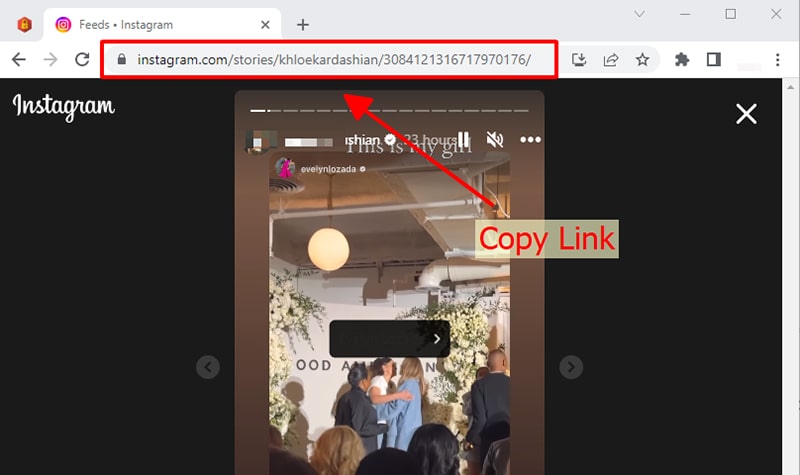
On PC/Mac: Open the photo or video you want to download, then copy the link in your browser's address bar.
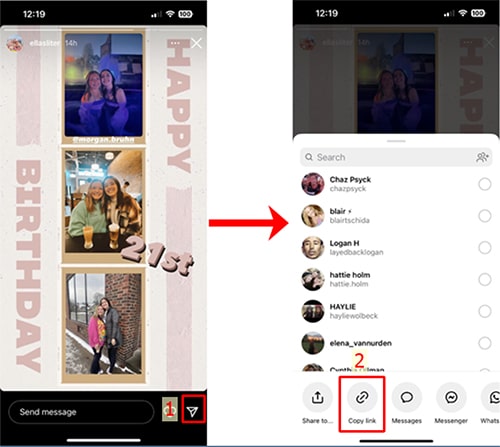
On iOS/Android: Open the Instagram post, tap the share icon () or three dots (●●●) and select "Copy link".
With SaveClip.me, you can easily download any content on Instagram including video thumbnails with just one click. All processing is done on our machine side. What are you waiting for? Come experience this great tool!
SaveInsta Downloader was invented to help you easily download Instagram content posted by yourself. We reserve the right not to provide services if you use this tool to violate the copyrights and information of others.
Read our terms of service 👉here👈
FAQ
What is SaveInsta?
How to use SaveClip.me to download Instagram videos and photos online?
- Step 1: Open and copy the Instagram photo or video link you want to download.
- Step 2: Paste the copied link into the input box on SaveInsta and press the "Download" button.